Most monitoring setups die in the gap between “we should really wrap that job” and actually opening the crontab. The job is boring, the syntax is fiddly, and the person who knows which jobs matter is not the person with time to do it. Coding assistants are good at exactly this kind of work, as long as they know the tool. From today they do.
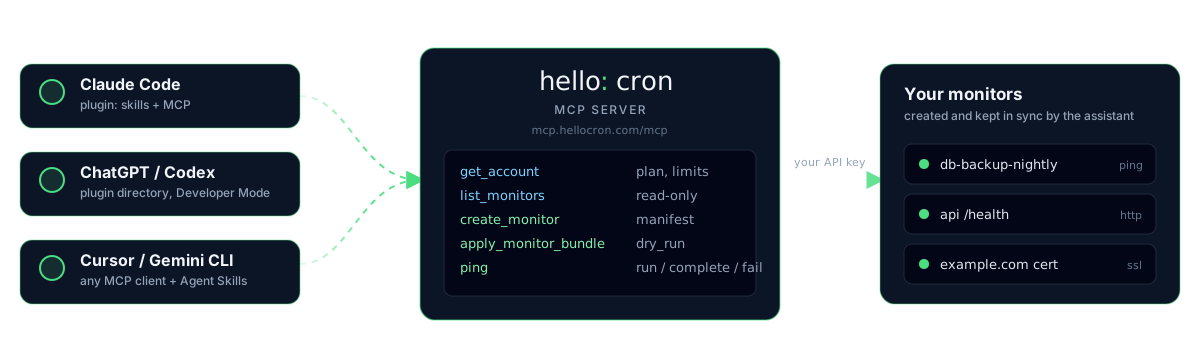
What shipped
Three pieces, one repository: hellocron/agent-plugin.
Agent Skills. Three Markdown files in the Agent Skills format, which Claude Code, Codex CLI, Cursor, GitHub Copilot, Gemini CLI and some forty other tools load on demand. One teaches the assistant the shell client: install, configure, doctor, run versus ping, discover, export and apply. One is about monitoring design: which kind of monitor for which job, how to name it, how to pick the expected interval and the grace period, how to wrap a cron line so the job keeps its exit code. The third covers the HTTP API and its error codes for the cases where there is no shell.
A hosted MCP server at mcp.hellocron.com. It exposes the public API as tools: get_account, list_monitors, create_monitor, update_monitor, apply_monitor_bundle with a dry run, ping, and delete_monitor, which refuses to do anything without an explicit confirmation. Tools carry the MCP annotations for read-only and destructive operations, so a client can ask before writes.
A plugin in the Agent Plugins format that bundles both, plus a marketplace manifest for Claude Code, a portable mcp.json for everything else, and instructions for a Custom GPT that talks to the API through Actions.
For agents that just browse, the docs now publish llms.txt and a single-file full text.
How it works without trusting us with your key
The MCP server stores nothing. Every tool call forwards the Authorization header from your MCP connection to the same public API that curl uses, so your key, its scopes, the plan limits and the rate limits apply exactly as they always did. Give the assistant a management key and it can manage monitors; give it an ingest key and it can only send pings. Revoke the key in the panel and the assistant is out.
The server itself is a small Go program behind our nginx, listening only on localhost, with no database access. It is a translation layer, not a new surface.
Two commands in Claude Code
export HELLOCRON_API_KEY=mk_...
claude plugin marketplace add hellocron/agent-plugin
claude plugin install hellocron@hellocron
Then a prompt like this does the boring part:
Install the HelloCron client on this server, verify it with doctor, and wrap every job in
/etc/cron.dso a failure or a missed run alerts me. Use a 10 minute grace for the hourly jobs and an hour for the nightly ones.
The assistant reads the skill, runs doctor, proposes the wrapped crontab lines with hellocron run, and, if the MCP server is connected, checks the plan limit before creating anything. Ask it to export the account as a bundle and you get a JSON file you can keep next to the crontab and apply from CI.
Codex and ChatGPT install the same plugin from their shared directory with codex plugin marketplace add hellocron/agent-plugin. Cursor, Gemini CLI, VS Code and any other MCP client take the server URL with the key in a header, and the skills folder copied into the project. The per-client steps are in the AI agents guide.
What we left out on purpose
No OAuth yet: the connection uses an API key, which is what CI and scripts use too. The public plugin directories of OpenAI and Anthropic require OAuth 2.0 for listing, so for now installation is by repository name rather than a search box. We would rather ship the working version and add the login flow when there is usage to justify it.
No UI inside the chat either. The tools return plain JSON, which every client renders well enough, and the panel remains the place to look at charts.
Try it and tell us what the assistant got wrong
Skills are text, so the fastest way to improve them is a real transcript where the assistant chose a bad grace period or misread an error. Open an issue in the agent-plugin repository with the prompt and what happened, and we will fold it into the next version.